Hours to Dollars: A Nonprofit’s Guide to Volunteer Grants
Every nonprofit operates within a familiar paradox: your community has an endless appetite for your services, but your team faces a finite supply of time and funding. To bridge the gap, you rely on a dedicated network of volunteers. But what if those hours on the ground could be seamlessly converted into unrestricted revenue for your mission?
Enter volunteer grants.
Also known as “Dollars for Doers” or employer-sponsored volunteer programs, volunteer grants are corporate giving initiatives in which companies donate funds to nonprofits in recognition of their employees' volunteer hours. For example, a company might offer $20 for each hour an employee volunteers at your organization, turning a single 10-hour shift into a $200 donation.
Despite corporate social responsibility (CSR) being at an all-time high, billions of dollars in available workplace giving funds go unclaimed every year. The culprit isn’t a lack of generosity; it’s a lack of awareness. Most volunteers simply do not know that their employer will pay your nonprofit for their time.
If your organization treats volunteering and fundraising as two entirely separate departments, you are leaving predictable corporate revenue on the table. In this guide, we’ll map out a frictionless, 4-step pipeline to help your team bridge the gap, turning your supporters' time into sustainable capital.
Step 1: Promote Volunteer Grants Directly on Your Volunteer Page
The single biggest obstacle to securing volunteer grants is a lack of awareness. Most supporters view volunteering and financial giving as two entirely separate activities. To capture this hidden corporate revenue, you must shatter that misconception at the exact moment a supporter’s engagement is at its peak: on your volunteer landing page.
When a prospective volunteer visits your website to sign up for a shift, they are highly motivated to help your cause. By introducing volunteer grants and Volunteer Time Off (VTO) right then and there, you immediately multiply the perceived value of their contribution.
Here’s how the American Lung Association includes volunteer grants on its core volunteer page:
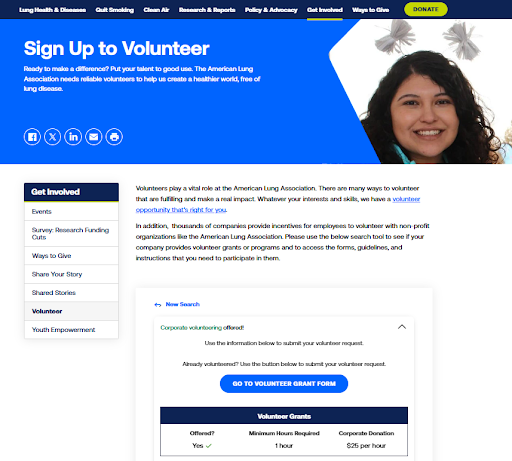
Understanding Corporate Volunteer Programs
To market these opportunities effectively, it helps to understand how they work together to benefit your nonprofit:
- Volunteer Time Off (VTO): A corporate benefit where companies give employees paid time off specifically to volunteer. This drastically lowers the barrier to entry for volunteering, without supporters missing out on their regular pay.
- Volunteer Grants (Dollars for Doers): The financial match paid out by the corporation to a nonprofit after a certain number of volunteer hours is logged by the company’s employees.
Both types of volunteer programs offer immense value to your organization. VTO unlocks additional “people power” by making it easier for individual employees to get involved. Meanwhile, volunteer grants supply unrestricted funding that directly supports your bottom line.
How to Promote Volunteer Grants on Your Website:
- Dedicate Prime Digital Real Estate: Don’t hide this information in a footnote. Create a clear, bold header on your main volunteer page that states: “Did you know your employer might pay us for your volunteer hours?”
- Embed a Corporate Search Widget: Integrate a self-service search tool (like Double the Donation) directly onto the page. This allows volunteers to type in their company's name and instantly view their specific grant criteria, hour requirements, and submission deadlines without leaving your site.
- Highlight Top Employers: Trigger immediate recognition by explicitly listing major corporations known for their exceptional volunteer grant and VTO policies. Name-drop companies such as Microsoft, Disney, Allstate, Dell, and Aetna to prompt local employees to consider their own workplace benefits.
- Cross-Link Your "Ways to Give" Hub: Ensure your volunteer page links back to your main donation matching page or workplace giving hub, and vice versa. This ensures that no matter how a supporter enters your ecosystem, they see the power of corporate philanthropy.
When you add volunteer grant information to your website, you increase program awareness among eligible individuals. That makes it simple for supporters to get involved, helping you increase revenue.
Step 2: Collect Employment Information on Your Volunteer Registration Form
You cannot optimize a revenue pipeline if you don't have the data to fuel it. If your organization doesn't know where its volunteers work, you are effectively leaving thousands of dollars in corporate funding to chance. The most seamless, high-conversion window to capture this data is right inside your sign-up process: on your volunteer registration form.
When supporters fill out a volunteer form, they are already in a "data-sharing" mindset. They expect to provide their contact info, availability, and skills. Adding a single, low-friction question about their employer feels entirely natural and provides your team with the exact data needed to unlock corporate dollars.
How to Implement This Seamlessly:
- Use an Autocomplete Search Field: Do not use a standard, open-ended text box for the "Employer" field. Open text boxes lead to messy data (e.g., "Microsoft," "MSFT," and "micro soft" will register as three different companies). Instead, embed an autocomplete search tool that pulls from a comprehensive corporate database. As the volunteer types, their company name is standardized and verified.
- Frame the Question with a Clear Value Proposition: Reduce form abandonment by explaining why you are asking for this information. Instead of just writing "Employer," use helper text that highlights the impact. For example: “Where do you work? Many companies match volunteer hours with a financial donation!”
- Respect Data Privacy: Include a brief note assuring volunteers that their employment information is safe, secure, and used solely to maximize corporate matching opportunities for your mission.
Why Data Collection at Registration is Essential
Many nonprofits make the mistake of trying to ask for employment info after an event or shift has concluded. However, post-event survey response rates are notoriously low. By making employment data a standard field during initial registration, you ensure 100% of new volunteers have the opportunity to provide the information as they enter your ecosystem.
This data allows your development team to map your volunteer network, identify corporate clusters (e.g., discovering that you have 15 volunteers from the same local bank), and instantly flag individuals who work for companies with verified "Dollars for Doers" programs.
Step 3: Deploy Automated Email Follow-Ups
Collecting employment data is a massive win, but data alone won't fund your mission. The real magic happens when you act on it. Corporate HR portals can be confusing, deadlines slip by, and people simply forget to log their hours. To turn those recorded hours into actual checks, your nonprofit must deploy a strategic, automated email follow-up sequence.
When a volunteer registers for a shift or completes their hours, their emotional connection to your cause is at an all-time high. Capitalizing on this momentum via targeted email workflows is the single most effective way to drive grant submission follow-through.
A generic, one-size-fits-all email blast rarely inspires action. Instead, use the corporate data you collected in Step 2 to segment and personalize your email outreach. By tailoring the message based on the recipient’s specific employer, you remove the guesswork and guide the volunteer directly to the finish line.
Workflow 1: The "Instant Match" Email (For Known Eligible Volunteers)
If your volunteer database flags a registrant who works for a company with a verified volunteer grant program (e.g., Apple, Home Depot, or Starbucks), they should receive a hyper-personalized email within 24 to 48 hours of completing their shift.
The Strategy: State the exact impact, name their company, and provide a direct link to their corporate giving portal.
Template Example:
Subject: Turn your [X] hours at [Nonprofit Name] into a corporate donation!
Hi [Volunteer Name],
Thank you so much for your hard work during your recent shift! Because of dedicated supporters like you, we can keep pushing our mission forward.
We noticed that you work at [Company Name]. Did you know that [Company Name] is willing to reward your volunteer time with a financial grant? Your recent shift of [X] hours qualifies us for a $[Y] corporate grant at absolutely no extra cost to you.
Interested? Please take 2 minutes to secure your grant:
Click here to log into the [Company Name] Employee Giving Portal: [Link to Portal/Guidelines]
Search for [Your Nonprofit Name] and log your [X] hours.
Thank you for doubling your impact!
Workflow 2: The "Discovery" Email (For Unknown or Unverified Volunteers)
If a volunteer leaves the employer field blank or works for a company whose corporate policy isn't immediately clear, they should receive an educational email designed to spark curiosity and action.
The Strategy: Educate them on the concept of "Dollars for Doers" and provide a self-service search tool so they can check their own eligibility.
Template Example:
Subject: Will your employer pay us for your volunteer shift? Let’s check!
Hi [Volunteer Name],
We loved having you volunteer with us recently! Your time on the ground makes a massive difference.
Did you know that hundreds of companies pay nonprofits for their employees' volunteer hours? It’s a corporate program often called "Dollars for Doers."
Can you take 60 seconds to see if your employer participates? Use our quick Workplace Giving Search Tool [Link] to type in your company’s name. If they qualify, the tool will give you step-by-step instructions on how to submit your hours so your company can send a financial donation to our cause.
Check your company's status here: [Link to Search Widget Page]
Best Practices for Your Volunteer Grant Email Strategy:
- Time It Perfectly: Send the email while the experience is fresh. The sweet spot is 24 hours after they check out of their volunteer shift.
- Include "End of Year" Triggers: Many corporate grant programs operate on strict calendar-year deadlines. Send a targeted "Last Chance to Log Your Hours" email blast every November (or early December) to capture any lingering corporate revenue before it expires.
- Keep the CTA Singular: Don’t clutter these follow-up emails with requests for social shares, upcoming event invitations, or newsletter sign-ups. Keep the focus entirely on a single call to action: Submit your volunteer hours.
Step 4: Cross-Check Eligibility for Other Workplace Giving Programs
A volunteer who takes the extra step to log their hours for a corporate grant is more than just a helper; they are a deeply engaged advocate for your mission. Because they are already familiar with their company’s CSR portal, they represent the perfect demographic for involvement in other workplace giving initiatives. The final step in your pipeline is to leverage this relationship by cross-checking their eligibility for programs like matching financial gifts.
When corporate philanthropy stops at volunteer grants, nonprofits miss out on another massive revenue stream. Companies that reward volunteer hours almost always offer a 1:1 or 2:1 match on financial donations as well.
Why Synergizing Corporate Giving Programs Works
By viewing volunteer grants and matching financial gifts as interconnected elements within a larger "Workplace Giving" strategy, you can unlock dual streams of corporate funding from a single supporter. Here’s how it works:
- The Volunteer-to-Donor Transition: If a volunteer grant recipient decides to make a financial contribution, your marketing materials should immediately remind them that their financial gifts can also be doubled by their employer.
- The Donor-to-Volunteer Transition: Conversely, if someone regularly utilizes corporate matching gifts for their financial donations, they are a prime candidate for a targeted recruitment campaign, inviting them to use their company’s volunteer program to join you for a “boots on the ground” shift.
How to Implement Cross-Checking and Maximization:
- Promote the Complete "Ways to Give" Ecosystem: Make sure your marketing collateral doesn’t present matching gifts and volunteer grants as mutually exclusive. On your website, group these resources into a comprehensive, user-friendly Workplace Philanthropy Page. Use an embedded corporate lookup tool that displays both policies simultaneously when a user searches for their employer.
- Tailor Your Appeals Around Multi-Impact Giving: When designing your annual fundraising appeals or end-of-year campaigns, ensure your messaging highlights both avenues. Remind your community that whether they choose to give their time or their treasure, their employer is ready to back them up with corporate dollars.
- Pursue One-Off Custom Corporate Partnerships: If your volunteer sign-ups reveal a high concentration of supporters coming from a specific local business that doesn’t have a formal corporate giving program, treat it as a warm introduction. Reach out to their HR or sustainability department. Use the organic data: “Ten of your employees contributed over 100 volunteer hours to us this quarter” is a powerful segue for pitching a custom corporate partnership, a group volunteer day, or a dedicated grant program for that specific company.
Conclusion & Actionable Next Steps
Volunteer grants represent an incredibly lucrative, predictable, and highly sustainable funding pipeline for nonprofits. By seamlessly weaving the promotion into your website, capturing corporate data at registration, keeping the momentum alive through targeted email follow-ups, and seeking multi-layered workplace giving opportunities, you can bridge the gap between your volunteer operations and your fundraising goals.
Top tip: When powered by the right tools, this strategy requires very little manual lift. By automating the entire data-capture and email workflow pipelines, your team can turn hours into unrestricted corporate dollars while focusing on what matters most: your mission.
Deepen Your Workplace Strategy
Ready to take your workplace giving strategy to the next level?